
Email is one of the easiest ways scammers reach people. It’s cheap, fast, anonymous, and they can send the same message to thousands or even millions of people at once. They don’t need everyone to fall for it. They only need a few people to panic, get curious, click the wrong link, open the wrong attachment, or type private information into a fake page.
I’m very careful with email. I can tell you that I’ve never fallen prey to an email scammer. That’s not because I’m lucky, and it’s not because scammers haven’t tried. They try constantly. I developed a set of logical rules years ago, before people would have called it an algorithm. Today, that’s exactly what it is: my personal email safety algorithm. If something happens, I know what to do. If something feels wrong, I stop. If an email tries to rush me, I slow down. If someone wants information from me, they’re not getting it.
Those rules have kept me safe, and I’m going to share them with you. Hopefully, you’ll see one or two that you hadn’t thought of before, and maybe I can save you from a very expensive, very frustrating mistake.
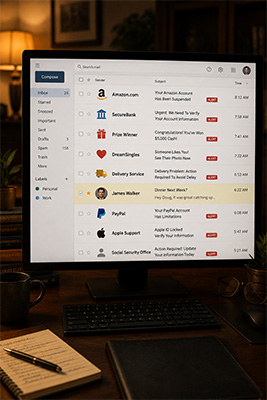 My first rule is simple: if I don’t know them, I don’t engage.
If you get an email from someone you don’t know, whether it’s a person, company, charity, dating site, delivery service, bank, lawyer, prize department, government office, or some mystery organization you’ve never heard of, be suspicious immediately.
Don’t be curious. Curiosity is one of the scammer’s favorite weapons. You see a subject line that says your card was charged, and you want to know what card. You see a message saying your account is locked, and you want to know which account. You see a note saying someone sent you photos, and you want to know who. You see a claim that you won something, and for half a second your brain says, “Well, let’s just see what this is.” That little moment is where trouble starts.
You should use email to communicate with people and companies you know and trust, and even then, you should use it in a guarded manner. Trust isn’t automatic just because a message lands in your inbox. Scammers aren’t contacting you because they care about you. They want your login, your credit card, your bank access, your Social Security number, your identity, your money, or your panic. Don’t give them any of it.
You didn’t win what you never entered.
You didn’t win a new car if you never entered a contest. You didn’t win a gift card from a store you don’t shop at. You didn’t win a lottery from a country you’ve never visited. You weren’t randomly selected for a payout, refund, grant, inheritance, settlement, crypto recovery, loyalty reward, or special customer appreciation bonus.
No one is sitting around saying, “Let’s give this man money today. We have no idea who he is, but he seems nice.” That’s not how the world works.
If an email says you won something, your first question shouldn’t be, “How do I claim it?” Your first question should be, “Did I enter anything?” If the answer is no, delete it. And if they ask for a processing fee, delivery fee, tax payment, verification payment, bank account, gift card, or anything else before releasing your prize, it’s not a prize. It’s a scam.
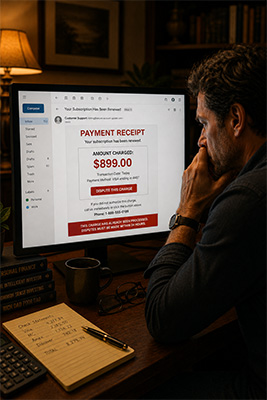 Fake bills are designed to make you panic.
One of the most common scams is the fake invoice or fake charge. You get an email saying your card has already been charged. Maybe it says PayPal. Maybe Norton, McAfee, Geek Squad, Amazon, Apple, or some company you recognize just enough to make you nervous. The amount is usually high enough to scare you but not so high that it feels impossible. It may be $399, $599, $899, or $1,299. Then they give you a phone number or a link to dispute the charge.
That’s the trap.
The goal isn’t always to get you to pay the fake bill. Sometimes the goal is to make you panic and contact them. Once you do, they can pressure you, confuse you, ask you to verify information, convince you to install remote access software, or send you to a fake login page. Now you think you’re fixing a problem, but you’re actually handing them the keys.
If you get a bill from a company you don’t know, don’t click anything in that email. If you think it might be real, open a new browser window and go to the company’s real website yourself. Type the address manually or use a bookmark you already trust. If it involves your bank or credit card, go directly to your bank or card site. Don’t use the email link. Don’t call the number in the email. Use the number on the back of your card.
That one habit can save you a fortune.
The sender name means almost nothing.
The name shown in your inbox can lie. An email may look like it came from PayPal, Amazon, Apple, your bank, your cable company, your doctor, a delivery service, or even someone you know. That display name isn’t enough. Scammers can make the sender name look familiar, and they know most people don’t look past that.
You have to look at the actual email address. If it says PayPal but the address is some ridiculous mess of letters, numbers, foreign domains, misspellings, or unrelated names, it’s fake. But even then, don’t get overconfident. Some scam addresses look close enough to pass a quick glance.
That’s why the safest rule is simple: don’t trust links in email when money, passwords, accounts, identity, or personal information are involved. Go directly to the source yourself.
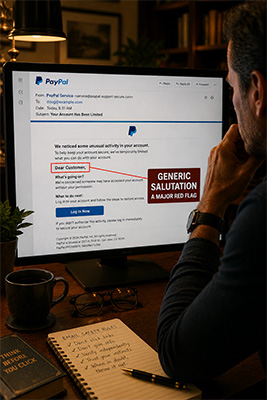 Look at the salutation.
I get scam emails that appear to be from PayPal. Some of them look extremely authentic. The logo is right. The layout is right. The colors are right. The wording is close enough to fool a lot of people. Then you read the salutation.
• Dear customer.
• Dear user.
• Hello member.
• Dear account holder.
That’s when you know.
If a company you actually do business with is contacting you about your account, they usually know your name. A generic salutation isn’t automatic proof of a scam, but it’s a warning sign. If the message doesn’t address you properly, slow down. If it doesn’t make sense, stop. If it sounds slightly off, trust that feeling. Your instincts are often faster than your logic, but people talk themselves out of their instincts because the email looks official.
Don’t do that.
Urgency is a warning sign.
Scammers love urgency. They want you emotional, rushed, afraid, and slightly off balance. They want you thinking, “I have to handle this right now.” That’s why scam emails use lines like “final notice,” “immediate response required,” “your account will be closed,” “your card has been charged,” “your package cannot be delivered,” “your password has expired,” or “legal action is pending.”
Urgency shuts down common sense. So when an email tries to rush you, do the opposite. Slow down.
A real company doesn’t need you to panic. A legitimate bank doesn’t need you to click a mystery link in the next five minutes. A real business doesn’t need gift cards. A real tech company doesn’t need remote access to your computer because of an email you didn’t ask for. Panic is the scammer’s steering wheel. Don’t let them drive.
Attachments are dangerous.
An email may say “invoice attached,” “receipt attached,” “legal notice attached,” “shipping label attached,” “contract attached,” “photos attached,” or “payment confirmation attached.” If you weren’t expecting it, don’t open it.
That’s especially true for zipped folders, strange file types, fake PDFs, or documents that ask you to enable editing, enable macros, sign in, or verify your account before viewing. A real attachment from a real person or company should make sense. If your accountant sends you a tax file during tax season, that’s one thing. If a stranger sends you an invoice for something you never bought, that’s something else entirely.
Delete it.
Dating emails are bait more often than destiny.
That person from the dating site you never joined isn’t going to be the love of your life. The beautiful stranger who suddenly wants to meet you, send you photos, or continue the conversation privately isn’t romance. It’s bait.
Romance scams work because people want to feel wanted. Scammers know that. They flatter you, compliment you, tell you they feel a connection, and then slowly move you toward some kind of request. Maybe they need help. Maybe they’re traveling. Maybe their phone is broken. Maybe their bank card is blocked. Maybe they want you to open a file. Maybe they want you to move the conversation to another app. Maybe they want to send you a link.
Don’t play. If you don’t know the person, and you didn’t initiate the contact, assume the email is garbage until proven otherwise.
If it doesn’t make sense, it’s probably fake.
This is one of my biggest rules. You get a shipping notice when you didn’t order anything. Fake. You get a subscription renewal for software you don’t use. Fake. You get a bank alert from a bank where you don’t have an account. Fake. You get a dating message from a site you never joined. Fake. You get a legal threat from a law firm you’ve never heard of. Fake. You get a refund notice from a company where you never spent money. Fake.
Most scams fall apart when you ask one simple question: does this make sense in my actual life? Not in some imaginary panic version of your life. Your real life. If the answer is no, delete it.
Never give information to someone who contacted you.
This one is critical. If someone contacts you, you don’t verify sensitive information for them. You don’t give them your password, banking login, Social Security number, credit card number, security codes, two-factor authentication codes, or anything else that could be used against you. You don’t send gift cards. You don’t install software because they told you to. You don’t let them remote into your computer.
If you need to verify something, you contact the company through a known, trusted method. You call the number on the back of your card. You use the official app. You type the website address yourself. You use your saved bookmark. You contact the person through a phone number or email address you already know is real.
The person who initiates the contact doesn’t get to control the verification process. That’s your job.
Don’t be embarrassed. Be prepared.
A lot of people who get scammed are embarrassed. They feel foolish. They say, “I should’ve known better.” Maybe. Maybe not. The scammers are good at what they do. They test wording. They copy real emails. They use fear, urgency, loneliness, greed, confusion, and curiosity. They don’t need to fool everyone. They only need to fool you at the wrong moment.
That’s why you need rules before the email arrives. Rules protect you when your mood doesn’t. You may be tired, busy, angry, lonely, distracted, or in a rush. Your rules don’t care. They work anyway.
That’s the point.
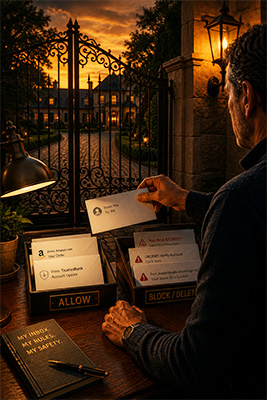 Here’s the simple version of my personal email safety algorithm:
• If I don’t know the sender, I don’t engage.
• If I didn’t ask for the email, I don’t trust it.
• If it involves money, I verify outside the email.
• If it creates panic, I slow down.
• If it asks for personal information, I refuse.
• If it has an attachment I didn’t expect, I don’t open it.
• If the salutation is generic, I get suspicious.
• If the sender address looks strange, I assume scam.
• If the message doesn’t fit my real life, I delete it.
• If I’m unsure, I contact the company directly through a known method.
That’s not paranoia. That’s self-protection.
Email is useful, but it’s also full of traps. You don’t need to be afraid of it, but you do need to respect it. Scammers are counting on you to be curious, rushed, emotional, careless, or just tired at the wrong moment.
Don’t give them that opening.
Your inbox isn’t a playground. It’s a doorway. Be careful who you let through.